

Blog
3-in-1 Data Cable

What Is a 3-in-1 Data Cable?
A 3-in-1 Data Cable combines three connector options within one cable. A common configuration includes:
- 🔌 USB Type-C
- 📱 Lightning
- 🔋 Micro USB
The exact connector combination can vary between products, so it is important to check the specifications before purchasing.
The main purpose is convenience. Rather than carrying separate cables for different devices, users can have multiple connector options available from one cable.
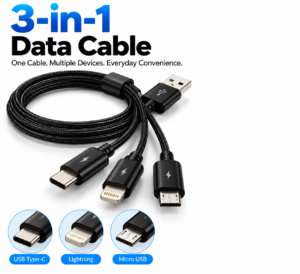
3-in-1 Data Cable
How Does a 3-in-1 Data Cable Work?
A typical 3-in-1 cable has a main USB connection and multiple device
-side connectors. The appropriate connector is selected according to the device being charged or connected.
For example, a compatible USB Type-C connector can be used with a device that has a USB-C port, while the Micro USB connector can be used with an older compatible device.
The cable does not make incompatible devices compatible automatically. The connector, charging requirements and supported functions must match the connected equipment.
Charging with a 3-in-1 Cable
One of the main reasons customers choose a 3-in-1 charging cable is the ability to charge different compatible devices using one accessory.
It can be useful with suitable:
- 📱 Smartphones
- 📱 Tablets
- 🔋 Power banks
- 🎧 Headphones
- 🔊 Portable speakers
- 🎮 Compatible gaming accessories
- 📷 Compatible cameras
- 🚗 Car chargers
- 🔌 USB power adapters
Charging performance depends on the cable, power source and connected device. For USB-C connections, USB Power Delivery can provide higher power levels when supported by compatible equipment. USB-IF states that USB PD specifications support power delivery of up to 240W with appropriate equipment.
This does not mean every 3-in-1 cable supports 240W charging. The actual capability must be confirmed from the product specifications.
3-in-1 Data Cable for File Transfer
Some 3-in-1 cables support both charging and data transfer, while others may have limited functionality on particular connector branches.
Where data transfer is supported, the cable may be useful for:
- 📸 Transferring photos
- 🎥 Moving videos
- 📄 Transferring documents
- 🎵 Moving music
- 💻 Connecting compatible devices to computers
- 💾 Managing compatible files
Data-transfer performance depends on the connector, cable construction and devices involved.
For USB-C specifically, the USB-C connector does not automatically indicate a particular data speed. USB-IF explains that USB Type-C can be implemented with different USB technologies and that Type-C, USB 3.2 and USB4 are not interchangeable terms.
Common Connector Types
USB Type-C
USB Type-C is a reversible connector used extensively in modern smartphones, tablets, computers, power banks and other electronics. Its reversible plug orientation makes it convenient to connect.
Lightning
Lightning is a connector associated with compatible Apple devices and accessories. If a 3-in-1 cable includes a Lightning connector, check that it is appropriate for the specific device and intended function.
Micro USB
Micro USB remains present on various older and portable electronics, including some power banks, speakers, cameras and other accessories.
Having these three connector types together can be useful for households with a mixture of newer and older devices.
Advantages of a 3-in-1 Data Cable
A multi-connector cable offers several practical benefits.
- 🔌 Multiple connector options
- ⚡ Convenient charging
- 💾 Data transfer where supported
- 📱 Useful for multiple compatible devices
- 🎒 Reduces the number of cables to carry
- ✈️ Convenient for travel
- 🚗 Useful in vehicles
- 🏠 Suitable for home use
- 💼 Convenient for office use
- 🪶 Compact and portable
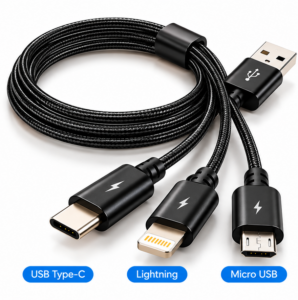
3-in-1 Data Cable
Are There Any Limitations?
The main limitation is that not all connector branches necessarily provide identical functionality. Some products may support charging across multiple connectors but offer data transfer only through a particular connection.
Charging several devices simultaneously may also be limited by the cable design and power source.
For this reason, customers should avoid assuming that a 3-in-1 cable automatically provides fast charging or high-speed data transfer across all three connectors.
How to Choose a 3-in-1 Data Cable
Check the Connector Combination
Confirm whether the cable includes the three connectors you actually need. A common combination is USB-C, Lightning and Micro USB, but product configurations can differ.
Check Charging Capability
If fast or high-power charging is important, check the cable’s stated power capability and ensure the charger and device support the same requirements.
Check Data-Transfer Support
If you need to transfer files, confirm that the specific connector you intend to use supports data transfer.
Consider Cable Construction
For frequent use, look for appropriate strain relief and a construction suited to regular handling. Avoid excessive bending, twisting or pulling near the connectors.
Consider Cable Length
Choose a cable length suitable for your charging environment. A compact cable can be convenient for travel, while a longer cable can be useful at a desk or bedside.
Ideal Uses for a 3-in-1 Cable
A 3-in-1 Data Cable can be particularly useful for:
- Travelling with multiple devices
- Charging different devices at home
- Keeping a spare cable in the car
- Office and workplace charging
- Connecting compatible devices to computers
- Reducing cable clutter
- Supporting households with different connector types
Frequently Asked Questions
Can a 3-in-1 cable charge three devices at once?
Some multi-connector cables may allow multiple devices to be connected, but simultaneous charging capability depends on the specific cable and power source. Check the manufacturer’s specifications.
Does a 3-in-1 cable support data transfer?
Some do, but functionality can differ between connectors. Always check whether the specific connector supports data transfer.
What connectors are usually included?
A common configuration is USB Type-C, Lightning and Micro USB, although the exact combination varies by product.
Is a 3-in-1 cable suitable for travel?
Yes. Its main practical advantage is that it can reduce the number of separate cables required when travelling with different compatible devices.
Conclusion
A 3-in-1 Data Cable provides a convenient way to connect and charge compatible devices with different connector types. By combining options such as USB Type-C, Lightning and Micro USB, it can reduce cable clutter and make everyday charging more convenient.
Before purchasing, check the connector configuration, charging capability, data-transfer support, cable length and device compatibility. Choosing a cable based on these specifications helps ensure it meets your actual charging and connectivity needs.
For customers who use several compatible devices with different ports, a 3-in-1 Data Cable can be a practical addition to a home, office, car or travel kit.