

Blog
laptop stand

What Is a Laptop Stand?
A laptop stand is a platform designed to support and elevate a compatible laptop. Laptop stands are available in different designs, including fixed, adjustable, foldable and portable models.
The main purpose is to change the laptop’s position on the desk. This can be useful when the laptop screen is too low for comfortable viewing.
WorkSafe Queensland recommends raising a laptop to a comfortable height when a separate monitor is not available. It also recommends a separate keyboard and mouse when a laptop is raised, allowing the screen and input devices to be positioned independently.

laptop stand
Why Use a Laptop Stand?
Better Screen Positioning
One of the main reasons to use a laptop riser is to raise the screen. WorkSafe Queensland recommends positioning a monitor around eye level or slightly below, although the appropriate position can vary between individuals.
Raising a laptop can therefore provide greater flexibility when arranging a workstation, particularly when the laptop is being used as a screen rather than as the primary typing surface.
A More Flexible Workstation
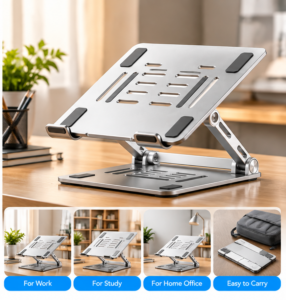
A laptop stand works particularly well with an external keyboard and mouse. Once the laptop is elevated, the keyboard and mouse can remain on the desk at a suitable working height.
This arrangement can be useful for:
- Working from home
- Office work
- Online study
- Programming
- Writing and research
- Video conferencing
- Extended computer tasks
laptop stand
Better Desk Organisation
A laptop stand for desk use gives the laptop a dedicated position and can make the workstation feel more organised. Some designs also create usable space underneath the laptop for compatible accessories and cables.
Key Features to Consider
Adjustable Height and Angle
An adjustable laptop stand allows users to change the screen position according to their desk setup and personal preferences.
Height and angle adjustment can be particularly useful when the stand is shared between different users or used in different locations.
Stable Construction
Stability is important because the stand must support the weight of the laptop during normal use.
Look for a design with a stable base, secure support points and suitable construction for your laptop’s weight.
Ventilation
Many laptop stands include openings or a raised platform underneath the computer. These features can allow more air movement around the underside of the laptop.
However, a stand should not be considered a replacement for the laptop’s own cooling system. Keep ventilation openings clear and follow the manufacturer’s instructions.
Foldable and Portable Design
A foldable laptop stand can be useful for people who regularly move between home, office, university and other locations.
WorkSafe Queensland recommends lightweight, folding laptop risers for mobile computer work where portability is important.
How to Set Up a Laptop Stand Correctly
A laptop stand works best when it is part of a complete workstation setup.
If the laptop is raised for extended work, consider using an external keyboard and mouse. This allows the screen to be positioned higher without forcing the keyboard to be raised to the same level. WorkSafe Queensland specifically recommends this approach for people working for long periods on laptops.
The screen should be positioned at a comfortable viewing height and distance. Lighting also matters because glare, poor lighting and prolonged focusing can contribute to visual discomfort.
It is also important to vary your posture and take regular breaks rather than remaining in one position for long periods.
Laptop Stand vs Laptop Cooling Pad
A laptop stand and cooling pad serve different purposes.
A laptop stand primarily changes the position and elevation of the computer. A cooling pad is specifically designed to provide additional cooling assistance, often using fans.
Some laptop stands incorporate ventilation openings, but the presence of ventilation does not necessarily mean the product is an active cooling pad.
Choose based on your main requirement: screen positioning and workstation organisation, or additional cooling functionality.
How to Choose the Right Laptop Stand
Before purchasing, consider the following:
Check Laptop Size and Weight
Confirm that the stand supports your laptop’s dimensions and weight. Larger laptops may require a wider platform and stronger support.
Consider Your Workspace
Measure your available desk space, particularly if you use a keyboard, mouse, monitor or other accessories.
Decide Whether You Need Adjustability
A fixed stand may be suitable for a consistent workstation, while an adjustable model provides greater flexibility.
Consider Portability
If you regularly carry your laptop between locations, look for a lightweight and foldable design that can fit comfortably in your bag.
Check Material and Grip
Non-slip contact points can help protect the laptop and keep it positioned on the stand. The construction should also be appropriate for the intended laptop weight.
Frequently Asked Questions
Is a laptop stand worth using?
A laptop stand can be useful for raising the screen, improving workstation flexibility and organising a desk. Its usefulness depends on how the laptop is used and how the rest of the workstation is configured.
Should I use a keyboard with a laptop stand?
For extended laptop use, an external keyboard and mouse are generally useful because they allow the elevated screen and input devices to be positioned independently.
Does a laptop stand help with posture?
A stand can help you position the laptop screen at a more suitable height, but it does not automatically create an ergonomic workstation. Chair height, keyboard position, mouse placement, screen distance and regular movement also matter.
Can I use a laptop stand with different laptop sizes?
This depends on the stand. Always check its supported dimensions and weight capacity before purchasing.
Are foldable laptop stands useful?
Yes. A foldable design can be convenient for students, remote workers and mobile users who need to transport their workstation accessories.
Conclusion
A laptop stand is a simple way to raise and reposition a compatible laptop while creating a more flexible desk setup. It can be particularly useful for work, study, video calls and other extended computer activities.
For longer sessions, combine the stand with a suitable external keyboard and mouse so the screen and input devices can be positioned independently. Check the stand’s size compatibility, weight capacity, adjustability, stability, ventilation and portability before purchasing.
Choose a laptop stand that matches your device and workspace, then adjust the entire workstation to a comfortable position for your everyday tasks.