

Blog
Micro Data Cable

Micro Data Cable: Charging, Data Transfer and Buying Guide
A Micro Data Cable is a practical accessory for connecting compatible Micro USB devices to chargers, computers, power banks and other USB equipment. Although newer devices increasingly use USB-C, Micro USB remains common on many older smartphones, cameras, Bluetooth speakers, GPS devices, power banks and other electronics.
A good Micro USB cable can provide both device charging and data transfer, making it useful as an everyday cable, replacement or spare. However, compatibility and performance depend on the cable and the devices connected to it.
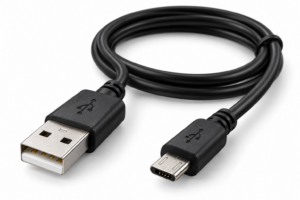
Micro Data Cable
What Is a Micro Data Cable?
A Micro Data Cable is a USB cable featuring a Micro USB connector on the device end. Many common versions use a standard USB-A connector on the other end, allowing the cable to connect a compatible device to a USB charger, computer or other USB port.
The USB-IF maintains specifications covering Micro-USB cables and connectors as part of the USB 2.0 standard.
Unlike a charge-only cable, a Micro USB data cable is designed to support data communication as well as charging when the connected devices and cable support those functions.
Charging with a Micro USB Cable
One of the most common uses of a Micro Data Cable is charging compatible devices.
The cable can connect a Micro USB device to a suitable USB power source, such as:
- USB wall chargers
- Power banks
- Computers
- Car chargers
- USB charging hubs
- Other compatible USB power sources
Charging performance is not determined by the cable alone. The power source, device and cable all affect the charging experience, so it is important not to assume that every Micro USB cable provides the same charging capability.
Micro USB Data Transfer
A major advantage of a Micro Data Cable is its ability to connect compatible devices for data communication.
Depending on the device and cable specification, it can be used for tasks such as:
- Transferring photographs
- Moving videos
- Copying documents
- Transferring music
- Connecting compatible devices to a computer
- Managing files on supported devices
USB 2.0 includes a High-Speed data rate of up to 480 Mb/s, although the actual performance of a particular connection depends on the devices, cable and implementation.
Which Devices Use Micro USB?
Micro USB was widely used across consumer electronics and is still found on many compatible devices.
A Micro Data Cable may be suitable for:
Smartphones and Tablets
Some older smartphones and tablets use Micro USB ports for charging and computer connectivity.
Cameras and Portable Electronics
Certain digital cameras and other portable electronics use Micro USB for charging or transferring files.
Power Banks and Accessories
Many power banks, Bluetooth speakers, headphones, GPS units and other accessories have used Micro USB connections.
The important consideration is the physical connector and supported USB functions. A device having a Micro USB port does not automatically mean that every cable will support every possible function.
How to Choose a Micro USB Data Cable
Before purchasing a Micro USB cable, consider several important factors.
Check the Connector
Make sure the device actually uses a Micro USB port. Micro USB is different from Mini USB and USB-C.
Check Data Support
If you need to transfer files, choose a cable specifically designed for data transfer rather than assuming a charging cable will provide data connectivity.
Consider Cable Construction
A cable that is regularly carried or used in a vehicle should have suitable strain relief and construction for its intended use. Avoid excessive bending, twisting or pulling around the connectors.
Consider Cable Length
Choose a length that suits your setup. A shorter cable can be convenient for portable use, while a longer cable may be more practical when the power source is further away.
Advantages of a Micro Data Cable
A Micro Data Cable offers several practical benefits:
- Supports charging on compatible devices
- Supports data transfer when compatible
- Useful for connecting devices to computers
- Works with suitable USB power sources
- Compact and portable
- Useful as a replacement or spare
- Suitable for home, office, vehicle and travel use
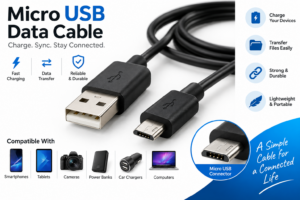
Micro Data Cable
Are There Any Limitations?
The main limitation is compatibility. Micro USB is an older connector standard, and newer devices increasingly use USB-C.
Data-transfer and charging performance can also vary depending on the cable, device and USB specifications involved. Therefore, customers should check the specifications of both their device and the cable before purchasing.
Frequently Asked Questions
Can a Micro USB cable transfer data?
Yes. A Micro USB cable designed for data connectivity can transfer data between compatible devices. However, some cables are designed only for charging, so check the cable specification before purchasing.
Can I use a Micro USB cable for charging?
Yes, provided the cable and device are compatible and the USB power source is suitable.
Is Micro USB the same as USB-C?
No. Micro USB and USB-C are different connector types. A Micro USB cable cannot be inserted directly into a USB-C port without appropriate compatible hardware.
What can I transfer with a Micro Data Cable?
On compatible devices, the cable can be used to transfer files such as photographs, videos, music and documents.
Conclusion
A Micro Data Cable remains a useful accessory for compatible electronics that use Micro USB. It can provide convenient charging and data connectivity for smartphones, cameras, power banks, speakers and other supported devices.
When choosing one, check the connector type, charging requirements, data-transfer capability, cable construction and length rather than choosing based on appearance alone. For anyone using compatible Micro USB equipment, keeping a reliable cable available can provide a convenient solution for everyday charging and connectivity.